Commissions
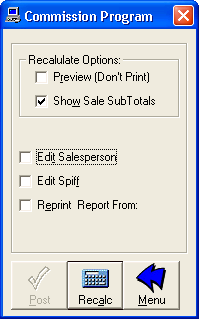 To pay commissions or edit Sales Staff for a sale, click Commissions from the InventoryS Menu.
Commissions Method
The Commission program can pay commissions either on Delivered or Written sales, with various formulas,
depending on what option you have selected in the Store Setup Commissions section.
Be sure to set this up before running your Commissions for the first time. You can contact WinCDS for more details on this one-time setup.
Generating Commissions Reports
The Commissions process consists of two steps.
First, the comissions reports are generated and either printed to the screen or the printer. At this point, nothing has changed in the database.
Second, you can choose to post the Commissions to the database. This actually marks the sales commissions as paid based on the reports generated.
To generate the report, select the options from the top of the form.
- To preview the report, select the Preview checkbox.
- If you want to view individual sale sub-totals, select the Show Sale Sub totals checkbox.
Click the Recalc button.
Post Commissions
When you have simply run the reports, the form will display NOT POSTED to indicate that the commissions have been run but not posted to the database.
After you have reviewed the reports, made any and all Sales Staff adjustments and run the reports again, and are satisfied, click Post to make the changes
permanent.
Edit Salesperson
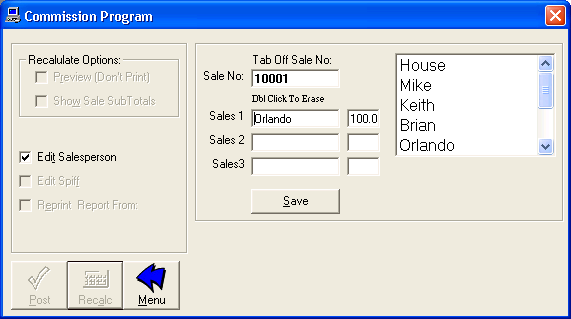
If you need to adjust the salesperson on a sale, check the Edit Salesperson checkbox.
Enter the sale number you wish to adjust and select the sales person and the sales percentages for the sale.
You will need to re-run the commissions report before posting after you do this.
Edit Spiff
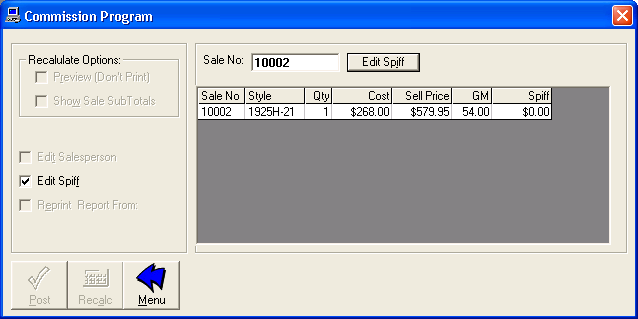
If you need to adjust the spiff on an item, check the Edit Spiff checkbox.
Enter the sale number you wish to adjust, go to the line-item you wish to change the spiff on and simply change it.
You will need to re-run the commissions report before posting after you do this.
Reprinting Comissions Reports
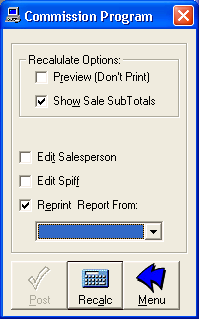
To reprint a prior period already posted, check the Reprint Report checkbox.
Select the date the desired report was run from the drop-down list and run the report.
The selected report should print to the printer or screen, depending on the option you selected.